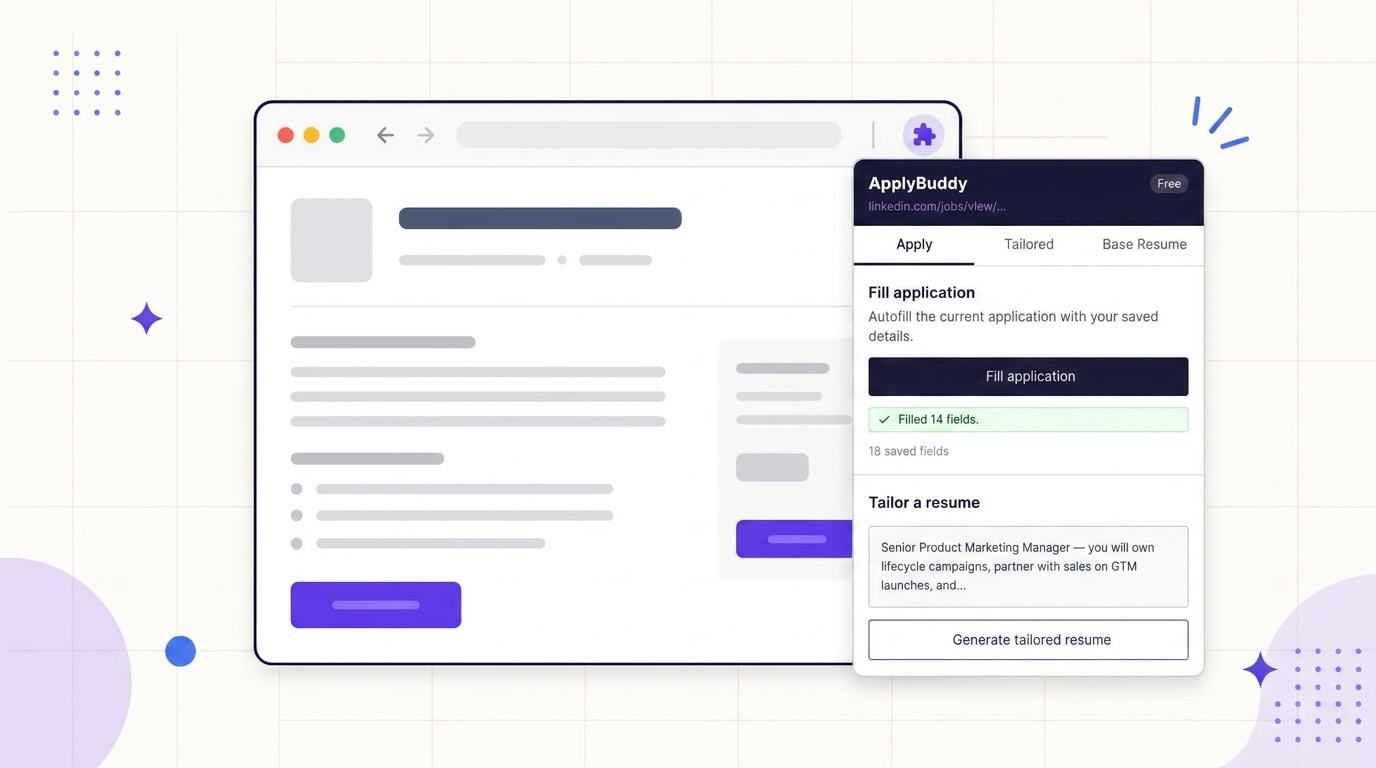
The ApplyBuddy Chrome extension is live on the Chrome Web Store. It moves the two slowest parts of applying — tailoring your resume and retyping your details into yet another form — into the tab where the job posting already is.
Before this, tailoring meant copying a job description, switching to your dashboard, pasting it in, waiting, downloading the PDF, switching back, and then filling out the application by hand. The extension collapses that into two clicks on the page you are already on.
What the extension does
Open the popup on any job posting and you get three tabs.
Apply
Two things live here, in the order you need them.
Fill application autofills the form on the current page from your saved autofill profile: name, email, phone, address, LinkedIn, GitHub, portfolio, current company and title, salary expectation, availability, and your most recent school and degree. It tells you how many fields it filled so you know what to check.
Tailor a resume is prefilled with the job description the extension pulled off the page. You pick which base resume to start from, optionally ask for a matching cover letter, and submit. The tailored version generates in the background and lands in your library.
Tailored
Every tailored resume you have made, searchable, with the same controls as the dashboard: download the PDF, redo the version, generate or re-generate a cover letter, and open the edits report to see exactly what changed and which keywords were matched. Editing opens the full web editor in a new tab.
Base Resume
Upload a new base resume, set your default, rename, delete, preview the PDF inline, and read the AI review and salary estimate attached to it.
What autofill fills, and what it leaves alone
Most autofill tools work off a list of sites someone built an integration for. Ours reads the form in front of it. It looks at what each field is actually asking for and answers from your profile, which is why it works just as well on the careers page of a 40-person company as it does on a big board. It is also why a “First name” box never ends up with your full name in it.
Three rules it does not break:
- It never overwrites. Anything you already typed stays exactly as you typed it.
- It skips the questions that matter legally. Work authorization, visa status, and sponsorship are recognized and then left blank on purpose. Those are your answers to give, not ours to guess.
- It never submits. Filling is where it stops. You read the form and hit submit yourself.
Your autofill profile is seeded from your resume — ApplyBuddy parses it into structured fields — and you edit it any time under Dashboard → Settings → Autofill. Whatever you save there is what the extension uses.
It knows when you are on a job posting
Land on a role and the extension badge lights up on its own. Open the popup and the job description is already sitting in the box, pulled off the page — no copying, no pasting, no switching tabs to find the text you just read.
It knows LinkedIn, Indeed, Greenhouse, Lever, Workday, and Glassdoor by heart. Everywhere else it reads the page and takes the best it can find, which covers the company career pages and niche boards where a lot of the good roles actually live. On the rare page where it grabs the wrong block of text, the box is editable. Paste over it and carry on.
Getting started
- Install it from the Chrome Web Store.
- Sign in with your ApplyBuddy account, or create one in the popup with email or Google. It is the same account as the web app.
- Upload a base resume in the Base Resume tab if you have not already. You will get an AI resume review and a salary estimate with it.
- Fill in your autofill profile once, at Dashboard → Settings → Autofill. It starts pre-populated from your resume.
- Open a job posting and use the Apply tab.
What is free and what is Pro
The extension itself is free. Your plan is what sets the limits, and it is the same plan across the extension and the web app.
| Feature | Free | Pro |
|---|---|---|
| Application autofill | Unlimited | Unlimited |
| Tailored resumes | 1 per account | One for every job |
| Base resumes | 1 | Unlimited |
| Redos | 1 per account | Unlimited |
| AI cover letters | — | Included |
| Price | $0 | $9.99/month or $99.90/year |
What this gives you back
Price out one application the old way. Copy the description, open your dashboard, paste, wait, download the PDF, switch back, then type your name, email, phone, LinkedIn, and last three jobs into a form you have filled out fifty times already. Fifteen minutes, if nothing goes sideways.
Now price it out with the extension open: click Fill application, click Tailor a resume, read it over, submit. You spend the time reviewing instead of typing.
The minutes are not really the point. Most people do not stop applying because they run out of roles worth applying to — they stop because the tenth application of the day costs more effort than they have left, so it turns into a tab they mean to get back to. Make each one cheap and the volume takes care of itself.
And nothing is stranded in the popup. Every tailored resume, cover letter, and base resume you create there is in your dashboard under the same account, ready for the deeper work — line-by-line editing, resume reviews, Resume Boost. One account, one library, nothing to sync.
FAQ
What does the ApplyBuddy Chrome extension do?
It reads the job posting you are viewing, generates a resume tailored to it, and autofills the application form from your saved details. You can also manage base resumes, download tailored PDFs, redo versions, and generate cover letters from the popup.
Is the ApplyBuddy Chrome extension free?
Yes. It is free to install and works with a free account. Free accounts get one tailored resume and unlimited autofill; cover letters and tailoring for every job are Pro at $9.99 per month. Pro includes unlimited tailored resumes.
Which job sites does the extension work on?
It knows LinkedIn, Indeed, Greenhouse, Lever, Workday, and Glassdoor by heart, and reads the page almost everywhere else. Autofill reads the form itself rather than a list of supported sites, so it is not limited to the big boards.
Does the extension submit job applications for me?
No. It fills what it can match and stops so you can review and submit. It also skips work authorization, visa, and sponsorship questions on purpose.
Do I need a separate account for the extension?
No. It uses the same ApplyBuddy account as the web app, so your resumes and autofill profile are shared automatically.
If you are applying to more than a couple of roles a week, the extension is where ApplyBuddy pays for itself in time. Install it, fill in your profile once, and tailor from the posting instead of from a second tab.
Tailor for your role
See what tailoring changes for the job you are actually applying to
Each role page shows the keywords a posting for that title expects, real before-and-after rewrites, and a free tailored resume for the posting you paste in.